TL;DR
This is a huge story of my recent journey to bring you guys the best damn AI model you can run locally in an unlimited way, no internet required, up-to-date SwiftUI, right inside of Xcode's new agentic code assistant, and then how it all fell apart at the end.
Why? The technology to easily distribute specialized AI models that run locally on a person's computer doesn't exist yet. 😞
Also... SwiftData Mastery in SwiftUI has been updated for iOS 26, so those who own it can download the latest copy, which includes a new section on Model Inheritance. Go get it!
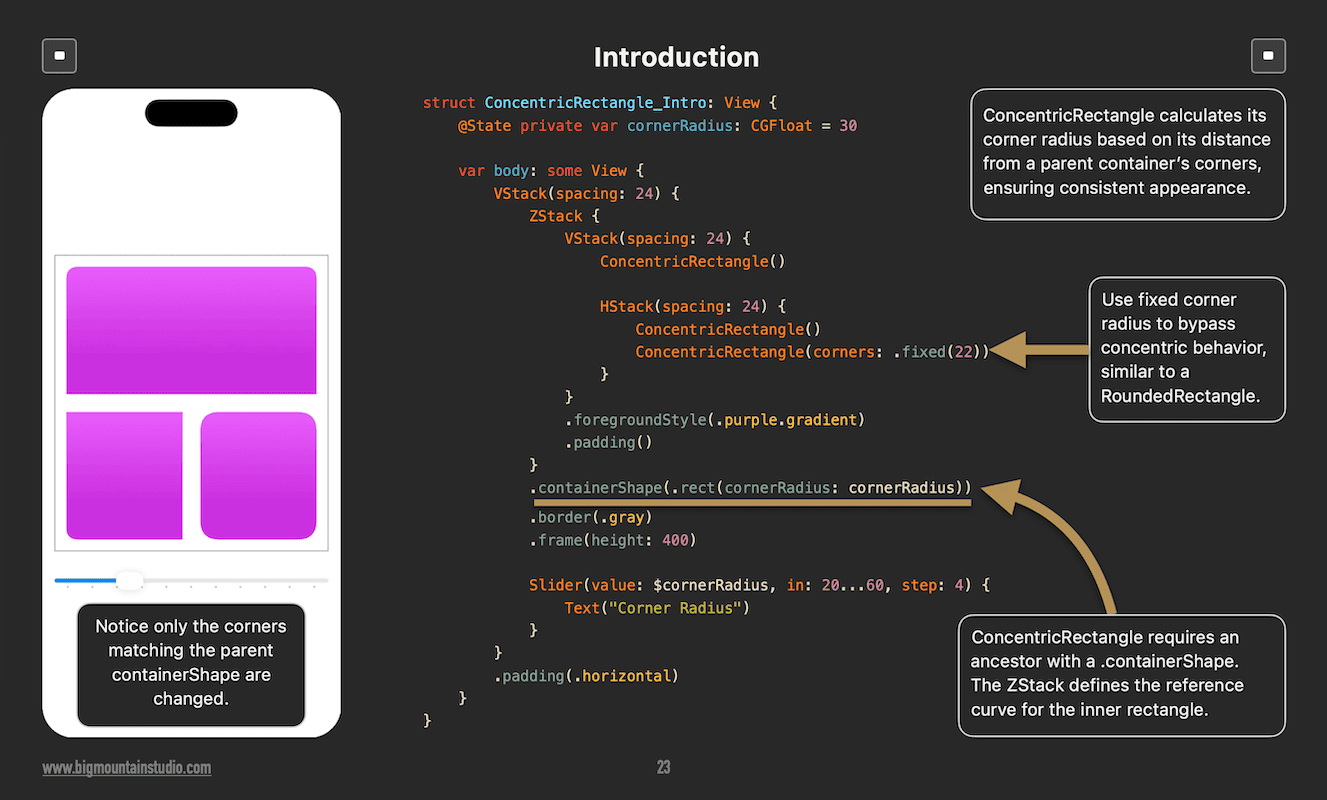
Advanced SwiftUI Views has a new section on ConcentricRectangle, too.
Running AI models locally feels a bit like owning a race car.
Powerful.
Exciting.
And somehow… impossible to lend to a friend.
That’s the problem I ran into.
And I didn’t even mean to go looking for it.
The Idea Hit Me on a Train With No Internet
I was on a 7+ hour train ride through Mexico.

No data connection.
No Wi-Fi. (Well, there was, but it never worked.)
No “just ask AI”.
That’s when the idea clicked.
Why can’t I have a coding assistant that:
Runs locally
Works offline
Has unlimited usage
Integrates directly with Xcode
Is actually good at SwiftUI
No rate limits.
No subscriptions.
No hallucinated APIs from three years ago.
Just… a smart helper sitting on my laptop.
I Knew It Was Possible (At Least in Theory)
After writing AI Mastery in SwiftUI, I knew it was possible.
This wasn't a theory.
This wasn’t magic.
Apple’s Foundation Models, locally running LLMs, fine-tuning models, and augmented generation all made this technically possible.
So, I did what any curious developer would do.
I went down the rabbit hole.
The Rabbit Hole: Local Models, Fine-Tuning, and RAG
At first, it feels amazing.
You discover coding models you can already run locally, like:
Qwen3-Coder
Codestral
Then you learn about how to make them better with:
Fine-tuning (like giving a general practitioner a specialized medical textbook to make them a surgeon).
LoRA and QLoRA (efficient ways to tweak a model’s behavior by only adjusting a tiny fraction of its internal settings).
Embeddings (converting complex ideas or text into a "map" of coordinates so the computer can measure how similar two topics are).
Vector databases (storage for those "maps" that allows the system to find related concepts almost instantly).
Retrieval-Augmented Generation (RAG) (providing the AI with an "open book" to look up facts before it answers your question).
It’s like learning how an engine works instead of just driving the car.
And here’s where I had a huge advantage.
My Secret Weapon: A Massive, Up-To-Date SwiftUI Library
Over the last 9 years, I’ve written books, projects, and bonus projects.
That means:
Thousands of SwiftUI files
Real production-style code
Modern APIs (iOS 26+)
Real examples, not blog-post snippets or API documentation snippets
Perfect training data.
So I started building.
What I Have So Far (The Good News)
I now have prototype models that:
Run locally
Work with Xcode Coding Assistant
Works offline, anywhere. No internet needed.
Perform well even with Xcode’s new agentic coding features
Free AI, no usage limits
More up-to-date than any locally running model
Honestly?
Seeing it work was surreal.
It felt like the future.
Then Reality Hit (The Hard Parts)
This is where things stopped being fun and started being… real.
Hardware Is Not Equal
I’m running a 64 GB RAM M2 MacbookPro.
Many developers are not.
I want this to work on:
Minimum: M1 with 16 GB RAM
That changes everything.
Conversation Length (Context Windows)
Your conversations will be shorter, depending on the model and how much RAM you have.
(To learn more about what context windows and tokens are, look at the Concepts chapter in AI Mastery in SwiftUI.)
Old Knowledge vs New Knowledge
Models don’t forget easily after training.
SwiftUI changes fast.
That means I have to:
Detect deprecated APIs
Reduce the importance of old knowledge
Boost newer, correct patterns
Think of it like teaching someone new rules without erasing bad habits.
When companies train models, they are not looking for outdated APIs and excluding them from training data. They just blindly train it all. That old GitHub repo of SwiftUI examples from 2019...yeah, that's in there.
I came up with a pretty clever way to keep deprecations from being generated, though.
Three ways of Improving Model Responses
There are three methods I experimented with to improve SwiftUI-generated code from locally run models:
-
Improving prompt instructions
If you've used any AI coding tools or IDEs, this is like providing instructions/steering documents to get what you want. "Avoid this. Prefer that."
You can change the model's behavior, make it nicer, or have it cut out the chit-chat, or have it take on a more educational tone, giving extra tips and tricks along the way.
You can bake this behavior right into a model.
-
Supplying additional information
The first method can only take you so far, but it can't ADD new knowledge. This method gives a model a way to look up current information it can work with. For example, giving a model proprietary corporate policy information that it can access when needed. "What is true right now?"
Think of ChatGPT projects or Gemini Gems, where you can drag and drop documents that the AI can look up when needed.
-
Fine-Tuning
Changes how a model thinks with your information.
The model readjusts how it predicts what words come after another as it pertains to your training data. "This is what I should tend to say when asked about _____."
💡You can do each one of these seperately or you can mix and match or do all 3 together.
(The last option that I'm not going to talk about is actually training a brand new model, which can take thousands of processors and weeks or months to do. It's unrealistic for one person with one computer.)
Turning Code Into “Math”
Retrieval-Augmented Generation (RAG) is an alternative to retraining or fine-tuning an existing model by providing extra knowledge that can be queried first.
The way it works is something like this:
Prompt: User prompts "What is the company policy on expensing meals?" (A model won't know about your company's policies.)
-
Retrieval (The Search): The system searches the company's internal knowledge base. It ignores irrelevant files (like HR benefits or tech manuals) and pulls the most relevant text:
Retrieved Snippet: "Section 4.2: The daily per diem for meals is $35.00 USD."
-
Augmentation (The Hidden Prompt): The system combines your question with the retrieved data into a single instruction for the AI:
System Instruction: You are a helpful assistant. Use the following context to answer the user. Context: Section 4.2: The daily per diem for meals is $35.00 USD. User Question: What is the company policy on expensing meals?
-
Generation (The Final Response) The AI reads the context and generates the specific answer:
AI Response: "According to Section 4.2 of the new policy, the daily meal allowance is $35.00 USD."
(If you have the book AI Mastery in SwiftUI and have read the chapter on Tools, this flow may look familiar.)
RAG sounds simple until you try it.
You have to:
Parse code correctly
Extract the right keywords
Chunk (break up into parts) files the right way
Convert all of that into numbers that actually mean something
The better you can do this, the better your answers.
Testing Never Ends
I now have scripts that:
Run many SwiftUI prompts
Analyze the responses
Check for required keywords
Make sure forbidden keywords don’t appear (deprecations)
It’s like unit testing… but for AI behavior.
And Then I Hit the Biggest Wall of All
Distribution.
This is the real problem.
Let me clarify something first. There are really 2 main ways I'm talking about when it comes to customizing existing AI models:
Fine-Tuning
Retrieval-Augmented Generation (RAG)
There are a lot of pieces involved for each method. In the end, it's not one single file like an app (which is what I thought it would be).
Let's talk about each method.
The Distribution Problem (The Missing Puzzle Piece)
There is no standard way to share:
Fine-Tuned Local Models
You need:
The base model (the model you are fine-tuning)
The fine-tuned weights
The tokenizer
The exact settings
The right quantization
Miss one piece and it breaks.
RAG Systems
RAG isn’t a single file.
It’s a machine made of parts:
Embedding model
Vector database
Chunking rules
Prompt templates
Retrieval logic
There’s no “download and run”.
It’s more like:
“Clone this repo, install 12 things, and hope.”
Now, imagine if you used both fine-tuning and RAG together to customize a local SwiftUI-specific model that blows away all other existing models? Yes, even those from the big AI companies.
It's complex.
Why This Matters
Because this problem blocks everything else.
Without a distribution standard:
Models can’t be shared easily
Offline AI stays niche
Every developer reinvents the same setup
Great local tools never leave their creator’s laptop
It’s not a skill problem.
It’s a packaging problem.
And I'm not just talking about the developer market either. This is a system-wide problem that goes into many business sectors adopting AI to make their businesses more efficient.
The problem is that businesses have no choice but to pay high fees to use third-party online services or host their own expensive internal servers, driving up expenses.
This problem is now evident as seen in the stock market, where AI expenditure is not paying off, and stock prices are starting to fall because of this. One of the only sectors where the return on AI investment is actually paying off is our market, the developer market.
Someday, specialized local models will be like apps you can download from the App Store, but that's not today.
In the future, I envision that operating systems will have their own standard AI model. Developers will be able to create specialized training data sets that can be hot-swapped in and out of the onboard OS AI model.
Where This Leaves Us
The models work.
The ideas work.
The demand - I'm not actually sure if there's demand for this yet. 😄 You guys could let me know, though.
But the ecosystem is missing something important.
A way to package and share local AI systems the same way we share apps.
Until that exists, local AI will feel powerful… but awkward.
Like a race car with no keys.
And that’s the problem I’m trying to solve next.
Book Updates
SwiftData Mastery in SwiftUI
In other news, SwiftData Mastery in SwiftUI has been updated for iOS 26!
Look for a new section: Models > Model Inheritance
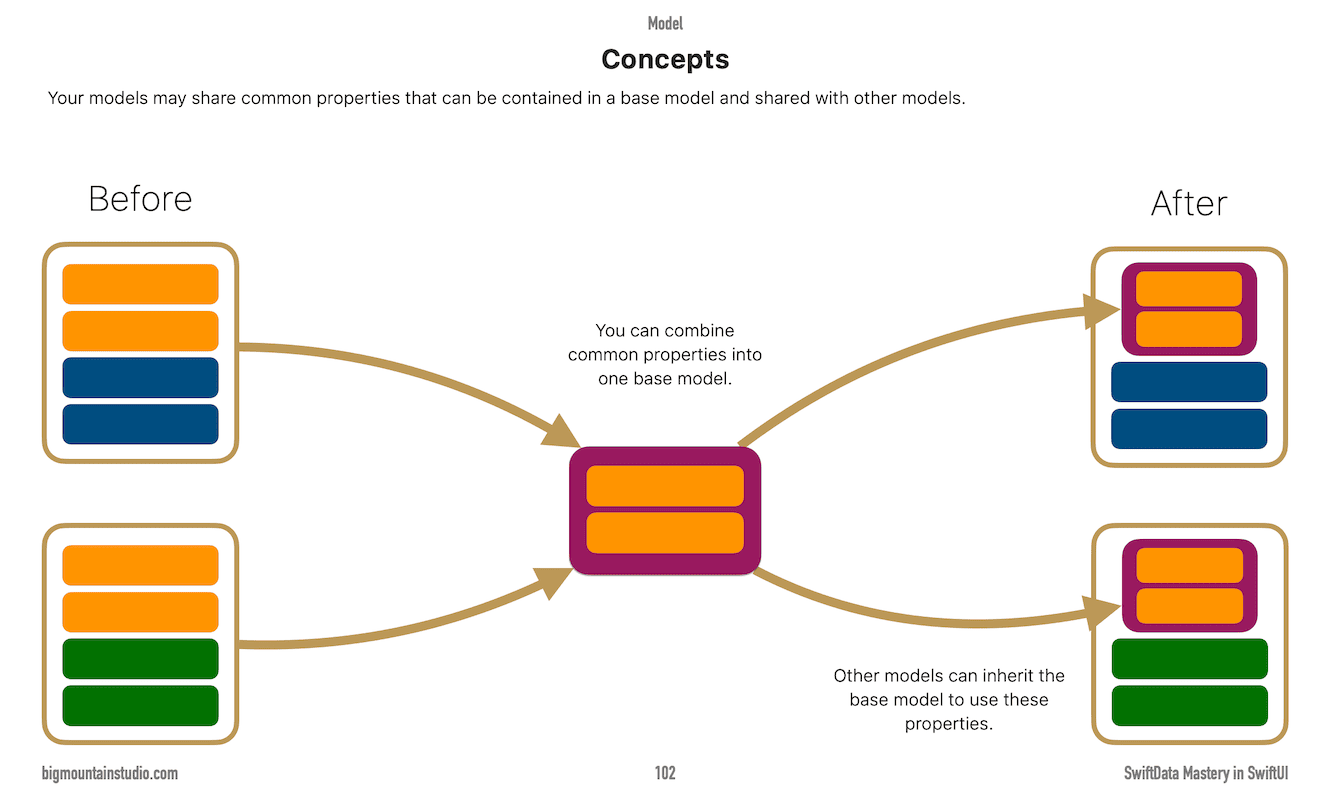
Up and down navigation in the book was also updated, like the other books.
All the bonus apps were also updated.
Advanced SwiftUI Views Mastery
Added a section on ConcentricRectangle was added in the Shapes & Other Views chapter at the beginning of the book.
Summary
I haven't quite given up on the fine-tuned model problem yet. There are a couple of other things I still want to try.
But there may not even be any demand for this, so let me know if this is something you would like:
Who This Is Actually For
This project isn’t for everyone.
It is for:
Developers who want offline AI
Developers who travel/want offline AI, or care about privacy
Developers tired of usage caps that seem to hit before the month-end
Developers who want modern SwiftUI knowledge
Developers who want to explore AI in Xcode without subscriptions
Personal developers first (with some corporate appeal because of privacy)
What This Is Not
Let’s be clear.
This is:
❌ Not a replacement for OpenAI or Anthropic models
❌ Not an IDE
❌ Not trying to “kill” cloud AI